crackme-Date of Birth

https://crackmes.one/crackme/5f4efbb133c5d4357b3b00a0

基本信息

项目 描述
文件 date_of_birth
类型 ELF 64-bit LSB PIE executable, x86-64
链接 dynamically linked
编译器 GCC 7.5.0 (Ubuntu 18.04)
符号表 stripped

初步分析

strings 提取

1
2
3
4
5
6
7
Welcome to Discard App -- a new way to get screwed up
We need to verify your age before you can usage the app
Please type you date of birth here:
You are too young! We are sorry but you cannot use Discard app at the moment
Congrats! Now you can use Discard app!
%20s
%m/%d/%Y

程序是一个虚构的 “Discard App”(Discord 谐音梗),要求输入生日来验证年龄。输入格式为 %m/%d/%Y(如 03/17/1898)。

导入函数

  • scanf — 读取用户输入
  • strptime — 按 %m/%d/%Y 格式解析日期字符串
  • mktime — 将 struct tm 转换为 time_t 时间戳
  • time — 获取当前时间
  • localtime — 将 time_t 转换回 struct tm
  • puts — 输出字符串

逆向分析

主函数流程 (0x710)

反编译后的伪代码:

1
2
3
4
5
6
7
8
9
10
11
12
13
14
15
16
17
18
19
20
21
22
23
24
25
26
27
28
29
30
int main(int argc, char **argv) {
char input[24]; // rsp+0x70
struct tm tm_birth; // rsp+0x30

puts("Welcome to Discard App -- a new way to get screwed up");
puts("We need to verify your age before you can usage the app");
puts("Please type you date of birth here: ");

memset(input, 0, 16);
scanf("%20s", input);

memset(&tm_birth, 0, sizeof(tm_birth));
strptime(input, "%m/%d/%Y", &tm_birth);

time_t birth_ts = mktime(&tm_birth); // 出生日期时间戳
time_t now = time(NULL); // 当前时间戳
time_t diff = now - birth_ts; // 时间差

struct tm *lt = localtime(&diff); // 关键:对时间差调用 localtime

int mday = lt->tm_mday; // r12d
int year = lt->tm_year; // ebx
int mon = lt->tm_mon; // ebp

int al = (mday + 1) & 0xFF;
int age = year - 70; // ebx -= 0x46
int edx = age;

// ... 年龄验证逻辑 ...
}

关键设计:用 localtime 计算”年龄”

程序并未用常规方式(年份相减)计算年龄,而是:

  1. 计算 diff = time(NULL) - mktime(birth_date)(秒级时间差)
  2. diff 调用 localtime(),将其当作一个绝对时间戳来解析
  3. 从返回的 struct tm 中提取 tm_yeartm_montm_mday
  4. tm_year - 70 作为 “年龄”(因为 tm_year 是自 1900 年起的年数,减去 70 即以 1970 年/Unix 纪元为基准)

年龄验证的控制流

反汇编的核心比较逻辑:

1
2
3
4
5
6
7
8
9
10
11
12
13
14
15
16
17
18
0x7fb:  lea    0x1(%r12),%eax       ; eax = mday + 1
0x800: sub $0x46,%ebx ; ebx = tm_year - 70 (即 "age")
0x803: mov %ebx,%edx ; edx = age
0x805: cmp $0x1e,%al ; if (mday+1) <= 30 ?
0x807: jle 0x853 ; → Path A
; else → Path B (fall through)

; ---- Path B: mday >= 30 ----
0x809: lea 0x1(%rbp),%ecx ; ecx = mon + 1
0x80e: cmp $0xb,%cl ; if (mon+1) > 11 ?
0x811: jg 0x859 ; → Path B2

; ---- Path B2: mon >= 11 (December) ----
0x859: lea 0x1(%rbx),%ecx ; ecx = age + 1
0x85c: cmp %dl,%cl ; compare (age+1) vs age (as bytes!)
0x85e: jg 0x81c ; if (age+1) > age → FAIL
0x860: jge 0x8ad ; if (age+1) == age → other path
; fall through → SUCCESS (0x862)

控制流图:

1
2
3
4
5
6
7
8
9
10
11
12
13
14
15
16
17
18
19
20
21
22
                    入口

┌───────┴───────┐
│ mday+1 <= 30 │
│ (Path A) │
▼ ▼
[0x853] [0x809]
mon<=11? mon+1>11?
│ │
┌────┴────┐ ┌────┴────┐
▼ ▼ ▼ ▼
[0x89e] [0x859] [0x813] [0x859]
mday>= age+1 mon>= age+1
mday+1? vs age mon+1? vs age
│ │ │ │
┌────┴────┐ ┌─┴──┐ ┌┴───┐ ┌─┴──┐
▼ ▼ ▼ ▼ ▼ ▼ ▼ ▼
SUCCESS FAIL S F 89c F S F

┌────┴────┐
▼ ▼
SUCCESS [0x89e]

漏洞:有符号字节溢出

所有通往 SUCCESS 的路径都要求某个值 大于其自身加一,这在正常情况下不可能。但程序使用 字节级比较%al%cl%dl%bpl%r12b),这就引入了有符号整数溢出

Path B2 的溢出利用

关键比较在 0x85c

1
2
3
lea    0x1(%rbx),%ecx    ; ecx = age + 1 (32位运算)
cmp %dl,%cl ; 但只比较低 8 位!(有符号字节)
jg FAIL ; if cl > dl (signed byte)

age = 127 (0x7F) 时:

变量 有符号字节解释
dl (age) 0x7F +127
cl (age+1) 0x80 -128

比较结果:cl (-128) > dl (127)False! jg 不跳转。

cl (-128) >= dl (127)False! jge 也不跳转。

于是 fall through 到 SUCCESS (0x862)

触发条件

要到达 Path B2,还需要满足:

  • tm_mday >= 30(进入 Path B)
  • tm_mon >= 11(即 12 月,进入 Path B2)
  • tm_year - 70 = 127(触发字节溢出)

因此 localtime(diff) 必须返回:

字段 所需值 含义
tm_year 197 年份 2097(1900+197)
tm_mon 11 12 月(0 索引)
tm_mday >= 30 30 或 31 日

即时间差 diff 对应的绝对日期落在 2097 年 12 月 30-31 日

求解

编写 C 程序暴力搜索满足条件的出生日期:

1
2
3
4
5
6
7
8
9
10
11
12
13
14
15
16
17
18
19
20
21
22
23
24
25
26
27
28
29
30
#include <stdio.h>
#include <time.h>
#include <string.h>

int main() {
time_t now = time(NULL);

for (int year = 1895; year <= 1905; year++) {
for (int month = 1; month <= 12; month++) {
for (int day = 1; day <= 28; day++) {
struct tm tm_birth = {0};
char buf[32];
snprintf(buf, sizeof(buf), "%02d/%02d/%04d", month, day, year);
strptime(buf, "%m/%d/%Y", &tm_birth);

time_t birth_ts = mktime(&tm_birth);
time_t diff = now - birth_ts;
struct tm *lt = localtime(&diff);
if (!lt) continue;

int age_val = lt->tm_year - 70;
if (age_val == 127 && lt->tm_mon >= 11 && lt->tm_mday >= 30) {
printf("MATCH: %s -> age=%d, mon=%d, mday=%d\n",
buf, age_val, lt->tm_mon, lt->tm_mday);
}
}
}
}
return 0;
}

运行结果(2026-03-16):

1
2
MATCH: 03/17/1898 -> age=127, mon=11, mday=31
MATCH: 03/18/1898 -> age=127, mon=11, mday=30

注意:正确日期与运行时的当前时间有关,不同日期运行结果会不同。

Flag 生成函数 (0x9d0)

通过验证后,程序用日期信息构造 XOR 密钥来解密内置的编码字符串:

密钥构造

1
2
3
4
5
6
7
8
9
; 打包 tm 值到 rdi
movzbl %bl,%edi ; edi = (tm_year-70) & 0xFF = 0x7F
movzbl %bpl,%ebx
shl $0x8,%rbx ; ebx = tm_mon << 8
or %rdi,%rbx ; rbx = (tm_mon << 8) | age
movzbl %r12b,%edi
shl $0x10,%rdi ; rdi = tm_mday << 16
or %rbx,%rdi ; rdi = (mday << 16) | (mon << 8) | age
call 0x9d0

解密逻辑

1
2
3
4
5
6
7
8
9
10
11
0x9d0:  mov    %edi,%edx           ; edx = packed_value
0x9d2: mov %edi,%eax ; eax = packed_value
0x9d4: mov %edi,%r8d ; r8d = packed_value
0x9d7: movzbl %dh,%edx ; edx = byte1 = tm_mon (0x0B)
0x9da: shr $0x10,%r8d ; r8d = byte2 = tm_mday (0x1F)
0x9e2: xor %edx,%eax ; eax = packed ^ tm_mon
0x9f1: xor %eax,%r8d ; r8d = tm_mday ^ eax → r8b = XOR key

; 对每个字节做 XOR 解密
0xa78: xor %r8b,(%rdi,%rsi,1) ; buf[i] ^= key
0xa7c: add $0x1,%rsi

密钥计算

对于 mday=31, mon=11, age=127

1
2
3
4
5
packed  = 0x001F0B7F
edx = 0x0B (tm_mon)
eax = 0x001F0B7F ^ 0x0B = 0x001F0B74
r8d = 0x1F ^ 0x001F0B74 = 0x001F0B6B
r8b = 0x6B ← 最终 XOR 密钥

编码数据

函数中硬编码了以下数据(小端序排列):

1
2
3
4
5
6
7
0x10: 3e 05 0d 04 19 1f 1e 05
0x18: 0a 1f 0e 07 12 4b 1f 03
0x20: 02 18 4b 0a 1b 1b 4b 03
0x28: 0a 18 4b 0a 09 18 04 07
0x30: 1e 1f 0e 07 12 4b 05 04
0x38: 4b 0d 1e 05 08 1f 02 04
0x40: 05 0a 07 02 1f 12 00

每个字节 XOR 0x6B

1
2
3
4
5
6
7
8
data = [0x3e,0x05,0x0d,0x04,0x19,0x1f,0x1e,0x05,
0x0a,0x1f,0x0e,0x07,0x12,0x4b,0x1f,0x03,
0x02,0x18,0x4b,0x0a,0x1b,0x1b,0x4b,0x03,
0x0a,0x18,0x4b,0x0a,0x09,0x18,0x04,0x07,
0x1e,0x1f,0x0e,0x07,0x12,0x4b,0x05,0x04,
0x4b,0x0d,0x1e,0x05,0x08,0x1f,0x02,0x04,
0x05,0x0a,0x07,0x02,0x1f,0x12,0x00]
print("".join(chr(b ^ 0x6B) for b in data))

运行结果

1
2
3
4
5
6
$ echo "03/17/1898" | ./date_of_birth
Welcome to Discard App -- a new way to get screwed up
We need to verify your age before you can usage the app
Please type you date of birth here:
Congrats! Now you can use Discard app!
Unfortunately this app has absolutely no functionality

Flag: Unfortunately this app has absolutely no functionality

总结

要素 详情
漏洞类型 有符号字节溢出(Signed Byte Overflow)
触发条件 tm_year - 70 = 127 (0x7F),使 (age+1) 的低字节溢出为 0x80 (-128)
所需输入 约 1898 年的出生日期(精确值取决于运行时间)
解密方式 单字节 XOR,密钥由 tm_mdaytm_montm_year 异或派生

crackme编码保存字符串

ASCII_CRACK

https://crackmes.one/crackme/69a806c17b3cc38c80464e06

1. 下载解压

zip解压密码:crackmes.one

2. IDA free

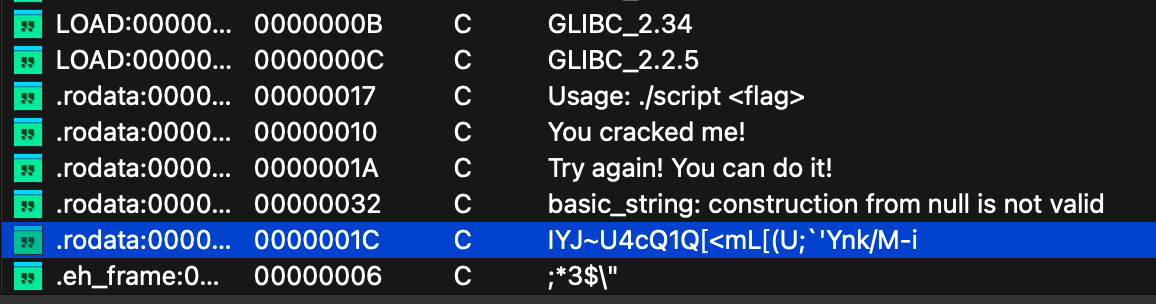
  • 先看字符串

  • 再看结构

3. GDB

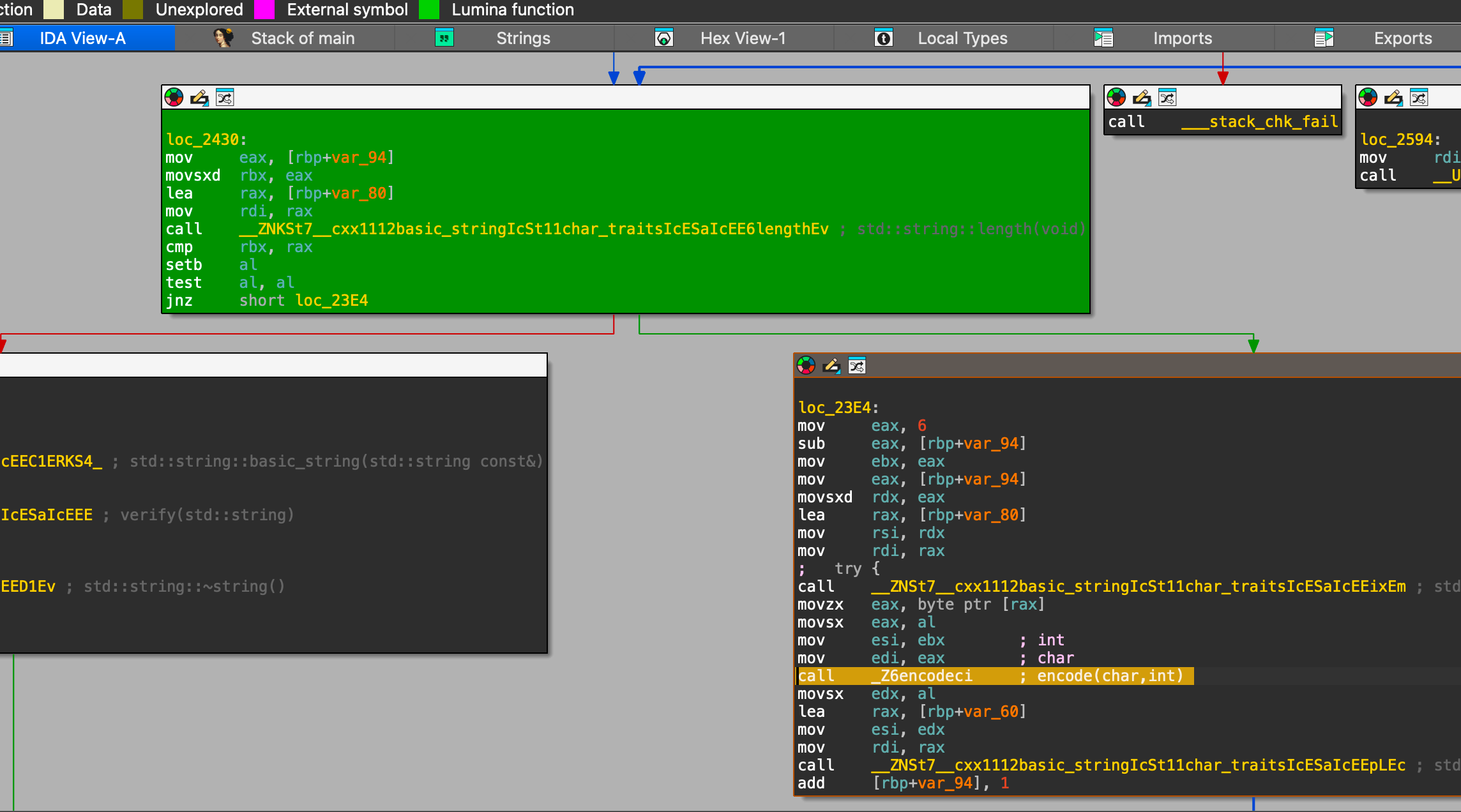
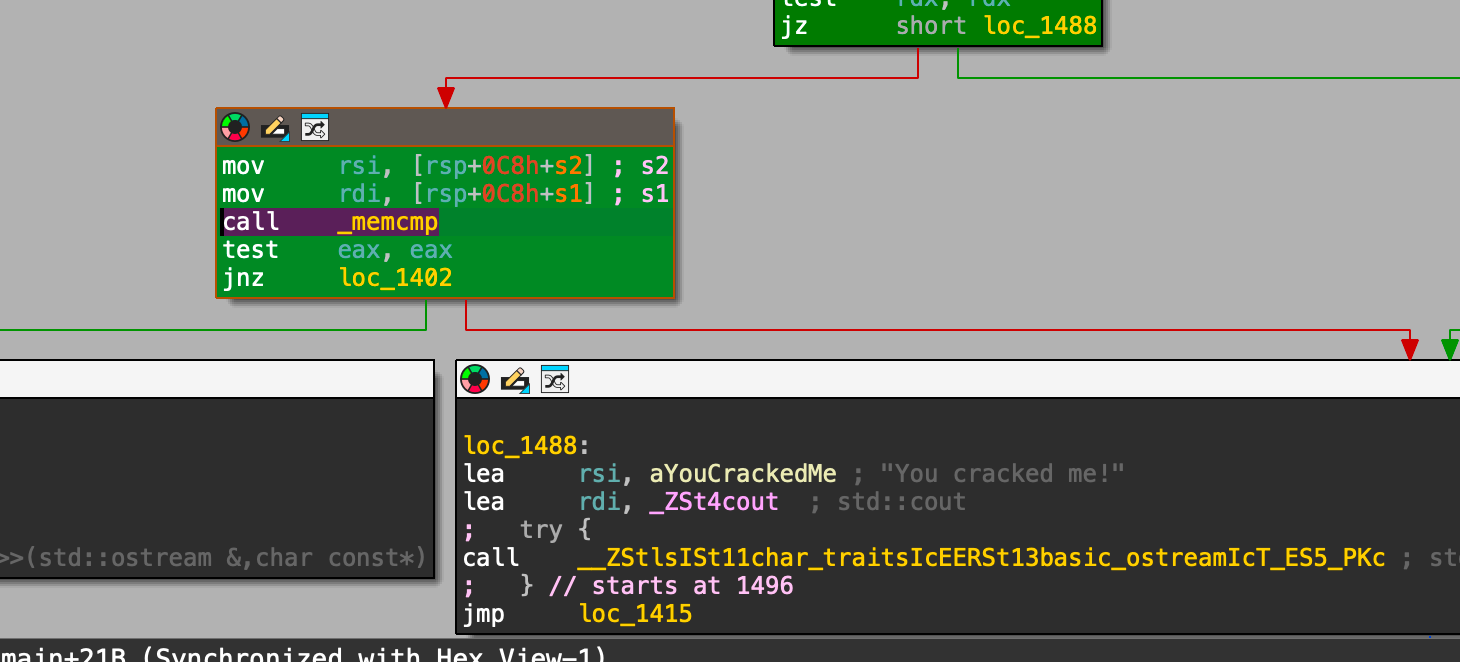
  1. 看到结构图后,基本能猜到,关键分支
1
2
3
4
5
6
7
8
9
10
0x55555555644b
test al, al

# 比较字符串
0x555555556469
call _Z6verifyNSt7__cxx1112basic_stringIcSt11char_traitsIcESaIcEEE ; verify(std::string)

# 核心编码函数
0x555555556413
call _Z6encodeci
  1. 先跑下
1
2
./ascii abcd
Try again! You can do it!
  1. 跑gdb
1
2
3
4
5
6
7
8
9
10
11
# 这个断点可以看到两个字符串在比较
b *0x555555556469

# 这个断点,决定了是做encode,还是比较编码后的结果
b *0x55555555644b

# 这里是对单个char做转化
b *0x555555556413

r abcd

4. 编码逻辑说明

1
2
3
4
5
6
7
8
# 编码的逻辑
# 对字符串中的每个字符的ascii code加一个数字,第一个字符数字加6,第二个数字加5,依次类推

# 解码的逻辑
# 把编码的逻辑反过来, python代码
s = "IYJ~U4cQ1Q[<mL[(U;`'Ynk/M-i"
result = ''.join(chr(ord(c) - (6 - i)) for i, c in enumerate(s))
print(result)

5. 验证结果

1
./ascii CTF{S3cR3T_AsSc1_Fl4g}{@_@}

逆向基础知识

逆向基础知识

0. 目标

本文通过一个简单的c程序,简要介绍逆向相关的基础知识。

1. 前置知识

  • 会c语言的基础语法,了解即可
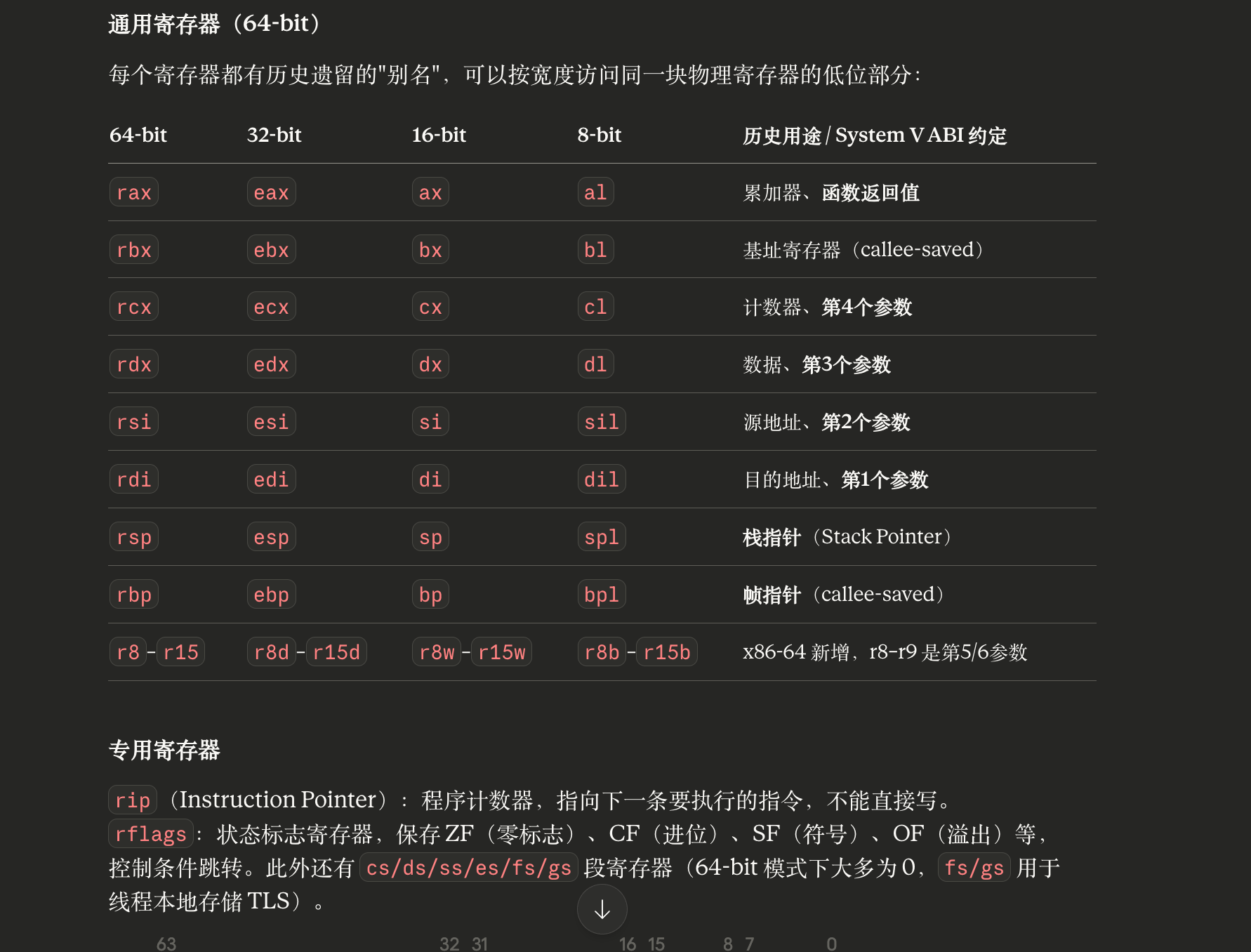
  • 知道x86的常用寄存器和汇编指令
  • 知道一些常用的gdb的命令

2. c程序

1
2
3
4
5
6
7
8
9
10
11
12
13
#include <stdio.h>

int sum(int a, int b) {
return a + b;
}

int main() {
int a = 10;
int b = 20;
int x = sum(a, b);
printf("sum=%d\n", x);
return 0;
}
1
2
3
4
# 编译,最好加上
# -g 用于gdb匹配到c代码
# -O0 告诉编译器不要优化, 如果被优化了,有些指令的顺序可能是乱的
gcc -g -O0 test.c -o test

3. 使用gdb调试

1
2
3
4
5
6
7
8
9
10
11
12
13
14
15
16
17
18
19
20
21
22
23
24
25
26
27
28
29
gdb test

# 启动tui,展示汇编指令
layout asm

# 展示通用寄存器的值, 如果程序还没开始执行,会显示Unavailable
layout regs

# 在main函数加断点
b main

# 查看所有断点
i b

# 执行单条指令, 如果遇到函数调用,会进入函数内
si

# 执行单条指令,如果遇到函数调用,不进入函数内
ni

# 查看栈中的数据
x/16xd $rsp

# 查看eflag
i r eflags

# 查看基地址
info proc mappings

4. 反汇编说明

1
2
3
4
5
6
7
8
9
10
11
12
13
14
15
16
17
18
19
20
21
22
23
24
25
26
27
28
29
30
31
32
33
34
35
36
37
38
39
40
41
42
43
44
45
46
47
48
49
50
51
52
53
54
55
56
57
58
59
60
61
62
63
64
65
66
67
68
69
70
71
72
73
74
75
76
77
78
79
80
81
82
83
84
85
86
87
88
89
90
91
92
93
94
95
96
97
98
99
100
101
102
103
104
105
106
107
108
109
# 默认是gnu风格汇编,这里改成intel风格
objdump -M intel -d test

# 这里只列出了关键的与c代码匹配的汇编,其他段暂时不相关
0000000000001149 <sum>:
1149: f3 0f 1e fa endbr64

# 保存上个栈帧的起始地址
114d: 55 push rbp

# 新建栈帧
114e: 48 89 e5 mov rbp,rsp

# 把第一个参数拷贝到栈上
# 细心的人,起始会发现一个问题,这里少移动rsp的动作,还没分配栈空间,就写入数据?其实这里利用了 x86_64 ABI 的 红区(Red Zone) 特性
# 因为sum函数中,没有调用其他函数,所以被称为叶子函数,所以栈顶下面的128字节是安全区,内核和信号处理不会破环,编译器为了少一条指令,所以去掉了分配的动作
1151: 89 7d fc mov DWORD PTR [rbp-0x4],edi

# 把第二个参数拷贝到栈上
1154: 89 75 f8 mov DWORD PTR [rbp-0x8],esi

1157: 8b 55 fc mov edx,DWORD PTR [rbp-0x4]
115a: 8b 45 f8 mov eax,DWORD PTR [rbp-0x8]

# eax=eax+edx
# 按规范,eax被用作函数返回值
115d: 01 d0 add eax,edx

# 切回到上个栈帧
115f: 5d pop rbp

# ret是call的逆操作
# ret指令相当于如下操作:
# pop rip ; 弹出返回地址,跳回 main
# 相当于
# 1. rip=rsp
# 2. rsp=rsp-0x8 这行就是把1185的call指令保存的rip的位置释放掉
1160: c3 ret

0000000000001161 <main>:
# 没球用
1161: f3 0f 1e fa endbr64

# 把rbp压栈,rbp保存的是当前栈帧的起始地址,
# 当内核加载完程序后,因为main函数并不是第一个被调用的函数,所以也是要返回到上层栈帧的,所以要先保存rbp的值到栈顶。
1165: 55 push rbp

# 把rsp保存到rbp中,相当于创建新栈帧
1166: 48 89 e5 mov rbp,rsp

# rsp=rsp-0x10, 在栈上分配16字节
# 因为栈底在高地址,所以rsp向下移动,表示分配栈空间
1169: 48 83 ec 10 sub rsp,0x10

# 给[rbp-0xc]块内存写入0xa,占用大小为4字节,DWORD(即double word),即a=10
116d: c7 45 f4 0a 00 00 00 mov DWORD PTR [rbp-0xc],0xa

# 给[rbp-0x8]块内存写入0x14, 即a=20
1174: c7 45 f8 14 00 00 00 mov DWORD PTR [rbp-0x8],0x14

# 让edx=0x14
117b: 8b 55 f8 mov edx,DWORD PTR [rbp-0x8]

# 让eax=0xa
117e: 8b 45 f4 mov eax,DWORD PTR [rbp-0xc]

# 前面4条指令,都是废话,起始可以直接给esi和edi赋值的
# 之所以要给这俩寄存器赋值,是为了要为函数调用传参,edi是第一个参数,esi是第二个参数
# 让esi=0x14
1181: 89 d6 mov esi,edx
# 让edi=0xa
1183: 89 c7 mov edi,eax

# 终于调用到sum函数了
# 这里的call指令相当于如下两个步骤
# push rip ; 压入返回地址
# jmp sum ; 跳转到 sum
# 这里是跳转到1149,1149是相对地址
# info proc mappings 可以查看基地址, 或者在gdb调试时,可以看到call 0x555555555149, 0x555555555149=0x555555554000+1149
1185: e8 bf ff ff ff call 1149 <sum>

# 把eax返回值,写入到栈上
118a: 89 45 fc mov DWORD PTR [rbp-0x4],eax
118d: 8b 45 fc mov eax,DWORD PTR [rbp-0x4]

# 下面是调用printf函数
# 把eax做为第二个参数
1190: 89 c6 mov esi,eax

# 计算一个地址,放入eax
1192: 48 8d 05 6b 0e 00 00 lea rax,[rip+0xe6b] # 2004 <_IO_stdin_used+0x4>

# 把填入rdi,作为第一个参数
1199: 48 89 c7 mov rdi,rax

# eax=0x0
119c: b8 00 00 00 00 mov eax,0x0

# 调用printf
11a1: e8 aa fe ff ff call 1050 <printf@plt>

# 把main函数的返回值设为0
11a6: b8 00 00 00 00 mov eax,0x0

# ?
11ab: c9 leave

# main函数返回,与sum函数退栈帧没区别
11ac: c3 ret

crackmes的逆向入门题目

easy_reverse

https://crackmes.one/crackme/5b8a37a433c5d45fc286ad83

1. 下载解压

zip解压密码:crackmes.one

2. objdump反汇编

1
2
3
4
5
6
7
8
9
10
11
12
13
14
15
16
17
18
19
20
21
22
23
24
25
26
27
28
29
30
31
32
33
34
35
36
37
38
39
40
41
42
43
44
45
46
47
48
49
50
51
52
53
54
55
56
57
58
59
60
61
objdump -M intel -d rev50_linux64-bit

00000000000011c4 <main>:
11c4: 55 push rbp
11c5: 48 89 e5 mov rbp,rsp
11c8: 48 83 ec 10 sub rsp,0x10
11cc: 89 7d fc mov DWORD PTR [rbp-0x4],edi
11cf: 48 89 75 f0 mov QWORD PTR [rbp-0x10],rsi

# 检查有参数
11d3: 83 7d fc 02 cmp DWORD PTR [rbp-0x4],0x2

11d7: 75 7e jne 1257 <main+0x93>
11d9: 48 8b 45 f0 mov rax,QWORD PTR [rbp-0x10]
11dd: 48 83 c0 08 add rax,0x8
11e1: 48 8b 00 mov rax,QWORD PTR [rax]
11e4: 48 89 c7 mov rdi,rax
11e7: e8 54 fe ff ff call 1040 <strlen@plt>

# 检查参数的长度为10
11ec: 48 83 f8 0a cmp rax,0xa

11f0: 75 54 jne 1246 <main+0x82>
11f2: 48 8b 45 f0 mov rax,QWORD PTR [rbp-0x10]
11f6: 48 83 c0 08 add rax,0x8
11fa: 48 8b 00 mov rax,QWORD PTR [rax]
11fd: 48 83 c0 04 add rax,0x4
1201: 0f b6 00 movzx eax,BYTE PTR [rax]

# 第5个字符是@
1204: 3c 40 cmp al,0x40

1206: 75 2d jne 1235 <main+0x71>
1208: 48 8d 3d 16 0e 00 00 lea rdi,[rip+0xe16] # 2025 <_IO_stdin_used+0x25>
120f: e8 1c fe ff ff call 1030 <puts@plt>
1214: 48 8b 45 f0 mov rax,QWORD PTR [rbp-0x10]
1218: 48 83 c0 08 add rax,0x8
121c: 48 8b 00 mov rax,QWORD PTR [rax]
121f: 48 89 c6 mov rsi,rax
1222: 48 8d 3d 07 0e 00 00 lea rdi,[rip+0xe07] # 2030 <_IO_stdin_used+0x30>
1229: b8 00 00 00 00 mov eax,0x0
122e: e8 1d fe ff ff call 1050 <printf@plt>
1233: eb 31 jmp 1266 <main+0xa2>
1235: 48 8b 45 f0 mov rax,QWORD PTR [rbp-0x10]
1239: 48 8b 00 mov rax,QWORD PTR [rax]
123c: 48 89 c7 mov rdi,rax
123f: e8 46 ff ff ff call 118a <usage>
1244: eb 20 jmp 1266 <main+0xa2>
1246: 48 8b 45 f0 mov rax,QWORD PTR [rbp-0x10]
124a: 48 8b 00 mov rax,QWORD PTR [rax]
124d: 48 89 c7 mov rdi,rax
1250: e8 35 ff ff ff call 118a <usage>
1255: eb 0f jmp 1266 <main+0xa2>
1257: 48 8b 45 f0 mov rax,QWORD PTR [rbp-0x10]
125b: 48 8b 00 mov rax,QWORD PTR [rax]
125e: 48 89 c7 mov rdi,rax
1261: e8 24 ff ff ff call 118a <usage>
1266: b8 00 00 00 00 mov eax,0x0
126b: c9 leave
126c: c3 ret
126d: 0f 1f 00 nop DWORD PTR [rax]

iptables 介绍

iptables 介绍

是什么

iptables 是 Linux 内核中 netfilter 框架的用户态管理工具,用于配置内核的包过滤规则。它工作在网络层(L3)和传输层(L4),可以对进出系统的网络包进行过滤、NAT、修改等操作。


核心概念:表(Table)和链(Chain)

iptables 用 来组织不同功能,每张表包含若干 ,链里存放具体的 规则

四张表(按优先级)

表名 用途
raw 连接跟踪前的处理,优先级最高
mangle 修改包头字段(TTL、TOS 等)
nat 网络地址转换(SNAT / DNAT)
filter 默认表,包过滤(ACCEPT / DROP)

五条内置链(对应 netfilter 钩子)

1
2
3
4
5
6
7
8
9
10
外部数据包


PREROUTING ──→ 路由判断 ──→ FORWARD ──→ POSTROUTING ──→ 出网卡
│ ▲
▼ │
INPUT OUTPUT
│ ▲
▼ │
本地进程 ─────────────────────────

规则匹配与动作

每条规则 = 匹配条件 + 目标动作(Target)

常见 Target:

  • ACCEPT — 放行
  • DROP — 静默丢弃
  • REJECT — 拒绝并回应
  • LOG — 记录日志
  • SNAT / DNAT / MASQUERADE — 地址转换
  • RETURN — 返回父链

常用命令

1
2
3
4
5
6
7
8
9
10
11
12
13
14
15
16
17
18
19
20
21
22
23
# 查看 filter 表规则(带行号)
iptables -L -n -v --line-numbers

# 查看 nat 表
iptables -t nat -L -n -v

# 放行 80 端口入站
iptables -A INPUT -p tcp --dport 80 -j ACCEPT

# 拒绝某个 IP
iptables -A INPUT -s 192.168.1.100 -j DROP

# SNAT:内网出口伪装
iptables -t nat -A POSTROUTING -s 10.0.0.0/24 -o eth0 -j MASQUERADE

# DNAT:端口转发(外部 8080 → 内部 192.168.1.10:80)
iptables -t nat -A PREROUTING -p tcp --dport 8080 -j DNAT --to-destination 192.168.1.10:80

# 删除规则(按行号)
iptables -D INPUT 3

# 保存规则(Debian/Ubuntu)
iptables-save > /etc/iptables/rules.v4

包处理完整流程

1
2
3
入站包:   PREROUTING(raw→mangle→nat) → INPUT(mangle→filter) → 进程
转发包: PREROUTING → FORWARD(mangle→filter) → POSTROUTING(mangle→nat)
出站包: OUTPUT(raw→mangle→nat→filter) → POSTROUTING(mangle→nat)

iptables vs nftables

iptables nftables
内核版本 2.4+ 3.13+
规则语法 分散(每个表独立命令) 统一语法
性能 线性匹配 支持集合/映射,更高效
现状 仍广泛使用 新发行版默认(iptables 已是 nft 的 shim)

现代系统(如 Ubuntu 22.04+)的 iptables 命令实际上是 iptables-nft 的软链接,底层已经是 nftables 了。


与你熟悉的场景对应

  • Docker:大量使用 iptables 的 nat 表和 filter 表来实现容器网络隔离和端口映射
  • Tailscale / Cilium:也会操作 iptables 或直接用 eBPF 绕过它
  • eBPF 的崛起:XDP 和 TC hook 可以在 netfilter 之前处理包,性能更高,是未来的方向

sysbench压测mysql案例

0. 背景

  • 这是plantegg在知识星球上的一个实验案例
  • 我们的数据库需要做在线升级,所以构造了一个测试环境,客户端Sysbench 用长连接一直打压力,同时Server 端的数据库做在线升级,这个在线升级会让 Server进程重启,所以毫无疑问连接会断开重连,所以期望升级的时候 Sysbench端 QPS 跌0几秒钟然后快速恢复,但是每次升级都是 Sysbench端 QPS永久跌0,再也不能恢复,所以需要分析为什么,问题出在哪里?有人说是服务端的问题因为只有服务端做了变更。

1. 实验环境

  • 服务端的环境
1
2
3
4
[ming@iZwz93i14h0qw5ez8anc3cZ ~]$ uname -r
5.10.134-19.2.al8.x86_64
[ming@iZwz93i14h0qw5ez8anc3cZ ~]$ cat /etc/redhat-release
Alibaba Cloud Linux release 3 (OpenAnolis Edition)
1
2
3
4
5
6
7
8
9
10
11
12
13
14
15
16
17
18
19
#安装docker/sysbench/mysql/tcpdump

#先跑一个mysql
docker run -it -d --net=host -e MYSQL_ROOT_PASSWORD=123 --name=plantegg mysql

#连接
mysql -h127.1 --ssl-mode=DISABLED -uroot -p123

#密码问题
ALTER USER 'root'@'%' IDENTIFIED WITH mysql_native_password BY '123';

#创建一个数据库
mysql -h127.1 --ssl-mode=DISABLED -uroot -p123 -e "create database test"

#随机生成点数据
sysbench --mysql-user='root' --mysql-password='123' --mysql-db='test' --mysql-host='127.0.0.1' --mysql-port='3306' --tables='16' --table-size='10000' --range-size='5' --db-ps-mode='disable' --skip-trx='on' --mysql-ignore-errors='all' --time='1180' --report-interval='1' --histogram='on' --threads=1 oltp_read_only prepare

#启动sysbench
sysbench --mysql-user='root' --mysql-password='123' --mysql-db='test' --mysql-host='127.0.0.1' --mysql-port='3306' --tables='16' --table-size='10000' --range-size='5' --db-ps-mode='disable' --skip-trx='on' --mysql-ignore-errors='all' --time='1180' --report-interval='1' --histogram='on' --threads=1 oltp_read_only run
  • 客户端有两种,使用ubuntu的是没问题的
1
2
3
4
# 有问题
Alibaba Cloud Linux release 3
# 没问题
Ubuntu 22.04.2 LTS (GNU/Linux 6.12.68-linuxkit aarch64)

2. 分析过程

  • 开始的时候问题没有这么清晰,每次升级才能稳定重现,后来想要定位问题就必须降低重现难度,考虑到重启客户端ECS 就能恢复,于是:

  • 不再重启ECS,只重启 Sysbench —— 能恢复

  • 不真正升级只重启Server —— 问题能稳定重现,重现容易很多了

  • 不重启 Server,只是kill掉Sysbench 的一条连接 —— 能重现

  • 将Sysbench 连接数从最开始100个,改成1个压 Server,然后 kill 掉 Sysbench 的一条连接 —— 能重现

  • 至此,通过show processlist;查看连接,会发现大量Connect

1
2
3
4
5
6
7
8
9
10
11
12
13
14
15
16
17
18
19
20
21
22
23
24
25
26
27
28
29
30
31
32
33
34
35
36
37
38
39
40
41
42
43
44
45
#mysql -h127.1 --ssl-mode=DISABLED -uroot -p123 test

mysql> show processlist;
+------+-----------------+-----------------+------+---------+---------+------------------------+------------------+
| Id | User | Host | db | Command | Time | State | Info |
+------+-----------------+-----------------+------+---------+---------+------------------------+------------------+
| 5 | event_scheduler | localhost | NULL | Daemon | 5715214 | Waiting on empty queue | NULL |
| 5736 | root | 127.0.0.1:36588 | test | Sleep | 0 | | NULL |
| 5737 | root | 127.0.0.1:50964 | test | Query | 0 | init | show processlist |
+------+-----------------+-----------------+------+---------+---------+------------------------+------------------+
3 rows in set, 1 warning (0.00 sec)

mysql> kill 5736;
Query OK, 0 rows affected (0.01 sec)

mysql> show processlist;
+------+----------------------+-----------------+------+---------+---------+------------------------+------------------+
| Id | User | Host | db | Command | Time | State | Info |
+------+----------------------+-----------------+------+---------+---------+------------------------+------------------+
| 5 | event_scheduler | localhost | NULL | Daemon | 5715249 | Waiting on empty queue | NULL |
| 5737 | root | 127.0.0.1:50964 | test | Query | 0 | init | show processlist |
| 5738 | unauthenticated user | 127.0.0.1:50334 | NULL | Connect | 1 | Receiving from client | NULL |
| 5739 | unauthenticated user | 127.0.0.1:50346 | NULL | Connect | 1 | Receiving from client | NULL |
| 5740 | unauthenticated user | 127.0.0.1:50348 | NULL | Connect | 1 | Receiving from client | NULL |
| 5741 | unauthenticated user | 127.0.0.1:50352 | NULL | Connect | 1 | Receiving from client | NULL |
| 5742 | unauthenticated user | 127.0.0.1:50354 | NULL | Connect | 1 | Receiving from client | NULL |
| 5743 | unauthenticated user | 127.0.0.1:50370 | NULL | Connect | 1 | Receiving from client | NULL |
| 5744 | unauthenticated user | 127.0.0.1:50378 | NULL | Connect | 1 | Receiving from client | NULL |
| 5745 | unauthenticated user | 127.0.0.1:50386 | NULL | Connect | 1 | Receiving from client | NULL |
| 5746 | unauthenticated user | 127.0.0.1:50402 | NULL | Connect | 1 | Receiving from client | NULL |
| 5747 | unauthenticated user | 127.0.0.1:50408 | NULL | Connect | 1 | Receiving from client | NULL |
| 5748 | unauthenticated user | 127.0.0.1:50412 | NULL | Connect | 1 | Receiving from client | NULL |
| 5749 | unauthenticated user | 127.0.0.1:50420 | NULL | Connect | 1 | Receiving from client | NULL |
| 5750 | unauthenticated user | 127.0.0.1:50430 | NULL | Connect | 1 | Receiving from client | NULL |
| 5751 | unauthenticated user | 127.0.0.1:50438 | NULL | Connect | 1 | Receiving from client | NULL |
| 5752 | unauthenticated user | 127.0.0.1:50448 | NULL | Connect | 1 | Receiving from client | NULL |
| 5753 | unauthenticated user | 127.0.0.1:50456 | NULL | Connect | 1 | Receiving from client | NULL |
| 5754 | unauthenticated user | 127.0.0.1:50468 | NULL | Connect | 1 | Receiving from client | NULL |
| 5755 | unauthenticated user | 127.0.0.1:50480 | NULL | Connect | 1 | Receiving from client | NULL |
| 5756 | unauthenticated user | 127.0.0.1:50492 | NULL | Connect | 1 | Receiving from client | NULL |
| 5757 | unauthenticated user | 127.0.0.1:50504 | NULL | Connect | 1 | Receiving from client | NULL |
| 5758 | unauthenticated user | 127.0.0.1:50520 | NULL | Connect | 1 | Receiving from client | NULL |
| 5759 | unauthenticated user | 127.0.0.1:50522 | NULL | Connect | 1 | Receiving from client | NULL |
+------+----------------------+-----------------+------+---------+---------+------------------------+------------------+
153 rows in set, 1 warning (0.00 sec)
  • 通过GPT得知:
1
2
3
4
•	User = unauthenticated user → 还没验证身份
• Command = Connect → 正在尝试连接
• Time = 6 → 已经卡了 6 秒
• State = Receiving from client → 正在等客户端发认证数据
  • 另外通过ss -tn | grep 3306, 得到大量连接,FIN-WAIT-2表示,本机是主动关闭的一方,并且对方回复了ack
1
2
3
4
5
6
7
8
9
10
11
12
13
14
15
16
17
18
19
20
21
22
FIN-WAIT-2 0      0      [::ffff:127.0.0.1]:3306  [::ffff:127.0.0.1]:40672
FIN-WAIT-2 0 0 [::ffff:127.0.0.1]:3306 [::ffff:127.0.0.1]:33748
FIN-WAIT-2 0 0 [::ffff:127.0.0.1]:3306 [::ffff:127.0.0.1]:57406
FIN-WAIT-2 0 0 [::ffff:127.0.0.1]:3306 [::ffff:127.0.0.1]:40094
FIN-WAIT-2 0 0 [::ffff:127.0.0.1]:3306 [::ffff:127.0.0.1]:58176
FIN-WAIT-2 0 0 [::ffff:127.0.0.1]:3306 [::ffff:127.0.0.1]:50176
FIN-WAIT-2 0 0 [::ffff:127.0.0.1]:3306 [::ffff:127.0.0.1]:49342
FIN-WAIT-2 0 0 [::ffff:127.0.0.1]:3306 [::ffff:127.0.0.1]:53442
FIN-WAIT-2 0 0 [::ffff:127.0.0.1]:3306 [::ffff:127.0.0.1]:42282
FIN-WAIT-2 0 0 [::ffff:127.0.0.1]:3306 [::ffff:127.0.0.1]:59408
FIN-WAIT-2 0 0 [::ffff:127.0.0.1]:3306 [::ffff:127.0.0.1]:55334
ESTAB 0 0 [::ffff:127.0.0.1]:3306 [::ffff:127.0.0.1]:53444
FIN-WAIT-2 0 0 [::ffff:127.0.0.1]:3306 [::ffff:127.0.0.1]:54006
FIN-WAIT-2 0 0 [::ffff:127.0.0.1]:3306 [::ffff:127.0.0.1]:58254
FIN-WAIT-2 0 0 [::ffff:127.0.0.1]:3306 [::ffff:127.0.0.1]:37044
FIN-WAIT-2 0 0 [::ffff:127.0.0.1]:3306 [::ffff:127.0.0.1]:60838
FIN-WAIT-2 0 0 [::ffff:127.0.0.1]:3306 [::ffff:127.0.0.1]:52766
FIN-WAIT-2 0 0 [::ffff:127.0.0.1]:3306 [::ffff:127.0.0.1]:37436
FIN-WAIT-2 0 0 [::ffff:127.0.0.1]:3306 [::ffff:127.0.0.1]:34862
FIN-WAIT-2 0 0 [::ffff:127.0.0.1]:3306 [::ffff:127.0.0.1]:32978
FIN-WAIT-2 0 0 [::ffff:127.0.0.1]:3306 [::ffff:127.0.0.1]:43728
FIN-WAIT-2 0 0 [::ffff:127.0.0.1]:3306 [::ffff:127.0.0.1]:35108
  • 至此,问题基本已经猜到是客户端有问题了,不然哪来的这么多连接?
  • 再抓包确认下
1
2
3
4
5
6
7
8
9
10
11
12
13
14
15
16
17
18
19
# 先确认下网卡,虽然127.0.0.1显然是lo
ip route get 127.0.0.1

# 查看网卡名
tcpdump -D
1.eth0 [Up, Running]
2.lo [Up, Running, Loopback]
3.any (Pseudo-device that captures on all interfaces) [Up, Running]
4.docker0 [Up]
5.bluetooth-monitor (Bluetooth Linux Monitor) [none]
6.nflog (Linux netfilter log (NFLOG) interface) [none]
7.nfqueue (Linux netfilter queue (NFQUEUE) interface) [none]
8.usbmon0 (Raw USB traffic, all USB buses) [none]

# 抓包并保存到文件
sudo tcpdump -i lo port 3306 -w 3306.pcap

# 拷贝回本地
scp ming@ali-sz:/home/ming/3306.pcap ./
  • 用wireshark打开

    • 正常情况
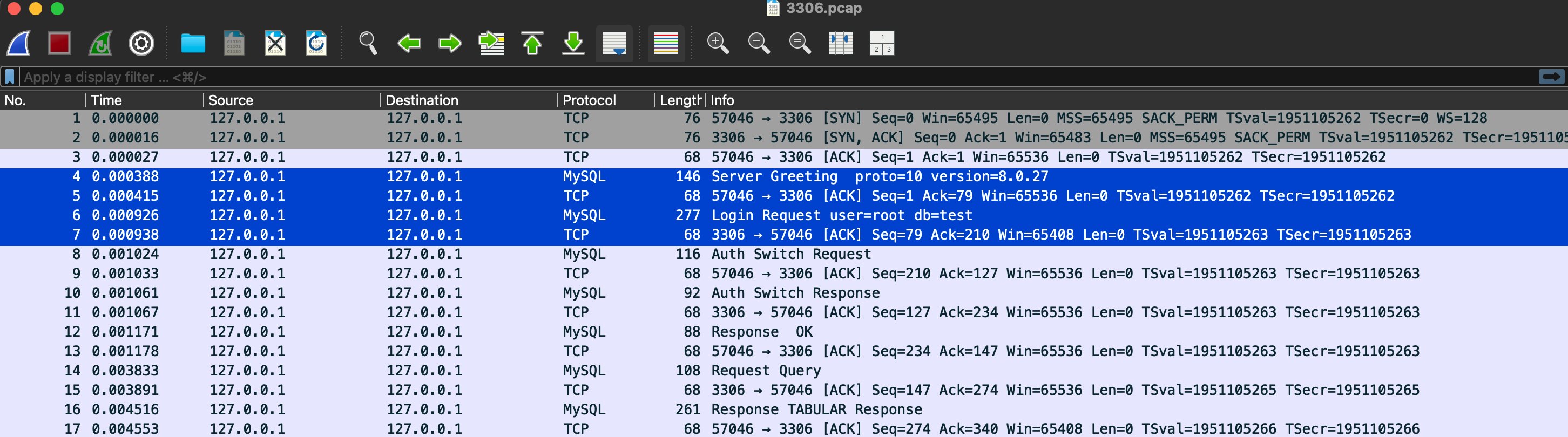
      alt text

    • kill掉连接后
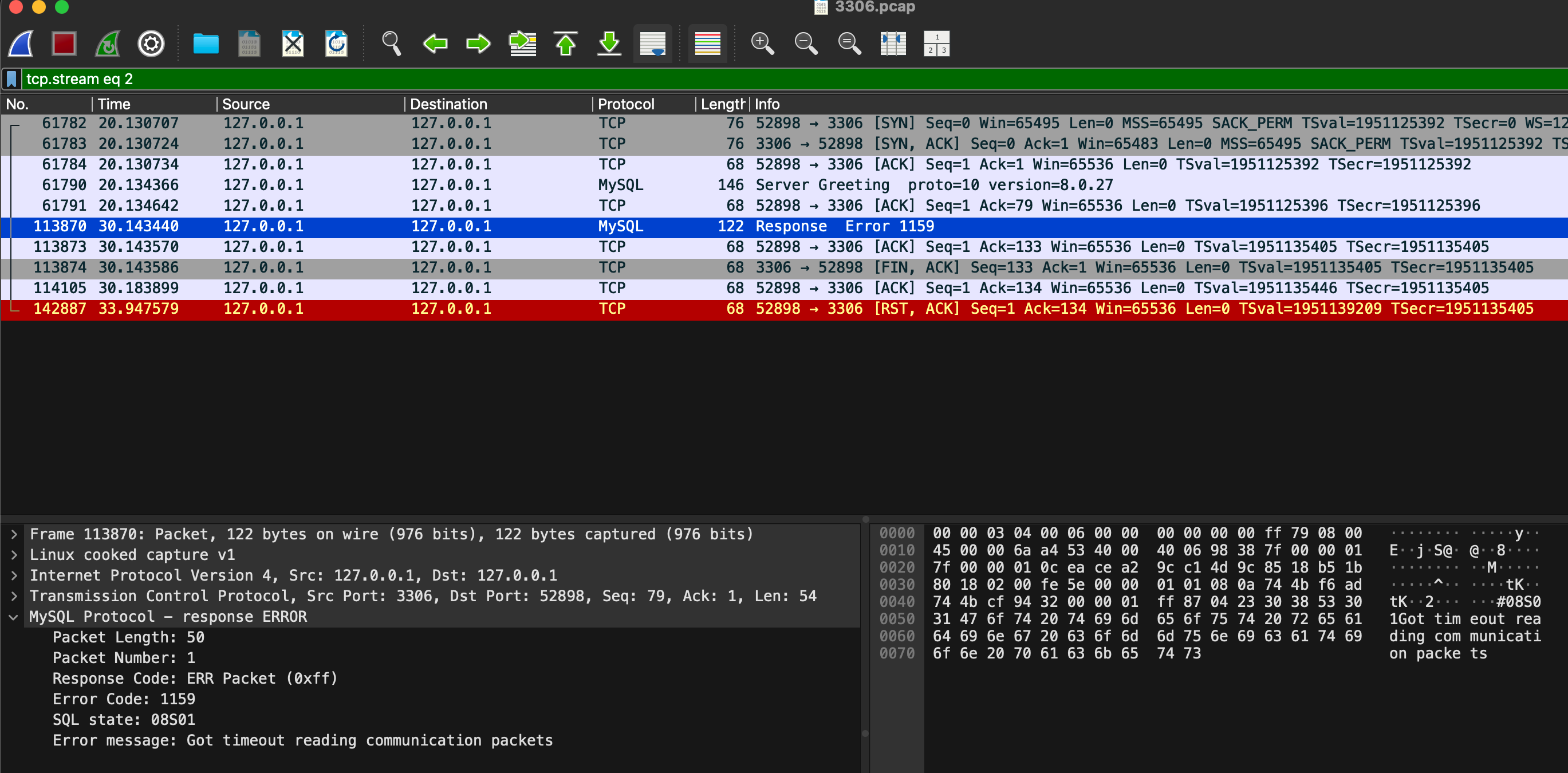
      alt text

  • 显然,当客户端重连时,没有走正常鉴权的协议,等了10秒,服务端超时,于是主动把连接fin掉。而客户端没有正常挥手,导致服务端的状态是FIN-WAIT-2。客户端应用在调用 close() 时,接收缓冲区中还有未读取的数据(即 Error 1159 那条消息和 FIN)。当 socket 被关闭但 receive buffer 中仍有未被应用层读取的数据时,内核不会走正常的 FIN 流程,而是直接发送 RST,表示异常终止(abortive close)。